

Approved bills go into the books you already keep
The free plan processes 25 invoices a month with unlimited users, takes no credit card and does not expire. You get your own intake address at the end of setup.
- Direct connector
QuickBooks Online
A bill with vendor, class and GL account
- Direct connector
Xero
A bill with account code and tax on every line
- File you map
CSV export
Your headers, your fields
invoice_no,
vendor, due_date, amount, property, gl_code, status
Where approved bills go
Three destinations, built and shipped. A connector writes a bill and its attachment, nothing else.
QuickBooks Online
Direct connector
- A bill with vendor, class and GL account mapped from your coding.
- The source PDF attached, and the external ID recorded against the document.
- One bill per company when a split crosses separate books.
Never creates vendors, accounts, classes or tax codes, never edits an existing bill, never pays anything.
On every plan, including free.
Xero
Direct connector
- A bill with the supplier resolved to a Xero contact.
- An account code and its own tax on every line, and tracking where you use it.
- The source PDF attached where the invoice arrived with one.
Never edits an existing bill, never pays anything.
No Xero certification, and not on the Xero App Store.
CSV export
File you map
- Seven columns by default, up to 64.
- At document or allocation granularity.
- You choose each header and the field behind it.
Generic on purpose: there is no per-product template, so you match your ledger's import format once.
On every plan, including free. SFTP delivery is on Pro and Enterprise, set up with us.
AppFolio, Buildium, Yardi and Rent Manager: Not built. No connector and no tested import profile. No date is set. They are on our roadmap, and the first customers on each system decide which we build first.
Why not, and what to use instead
There is no connector code, no import profile and no tested mapping for any of them, and we are not going to promise a date.
Every word of that is about approved bills going OUT to them. Setting inletAP up from a spreadsheet one of them exported is the opposite direction, and it is described below.
Nor is any of them reachable “through the CSV”. The CSV is a file you map to whatever your system imports, not a named connector for any product.
inletAP sits in front of your property management system rather than replacing it. The expensive part of AP comes before the write-out: opening the mail, reading the PDF, finding the building and the person who signs it off.
If a direct connector to your system is the deciding factor, say so. We would rather know than win the evaluation on a claim we cannot back.
When a ledger refuses
A failed export is a fix, not a cleanup. A retry cannot post a second bill.
- Each ledger is tried on its own. One refusing does not roll the other back, and the document reads partially exported rather than posted.
- Every batch records what it contained, what it created and what it failed on. Anything already posted is recognized by its external ID and skipped.
Bright Green Landscaping
One export run · two ledgers
- QuickBooks OnlineBill created · external ID recorded$1,595.00
- XeroRefused: account code not on the chart
A retry skips the bill QuickBooks Online already holds.
The other direction
Getting your data in is a different question from getting bills out
1 · Match your columns
- Building NameHarborview ApartmentsName
- Street410 Harbor WayAddress line 1
- OwnerHarborview LLCEntity
- Doors48Door count
2 · Read the preview
This file would create 12 properties, update 3 and leave 40 unchanged. 1 row cannot be imported.
- CreateLakeshore
- UpdateMaple CourtDoors 24 → 26
- Not importedRow 9 matches two properties
A file you export, read once, at setup
- Property, unit, vendor and entity lists, from the system you run today or from the inletAP template. 5,000 rows per file. No invoices and no history.
- Four layouts are recognized on sight: the inletAP template, DoorLoop, Rentec Direct and TenantCloud. That is a list of spreadsheet layouts, not a list of connectors.
- There is no connection to any property management system, in either direction. AppFolio, Buildium, Yardi and Rent Manager still have no connector — and their exports still import here, by matching the columns yourself.
- The preview comes first. Importing then writes in batches of 100 rows, and the same file again finishes a stopped import rather than duplicating it.
Where invoices come in
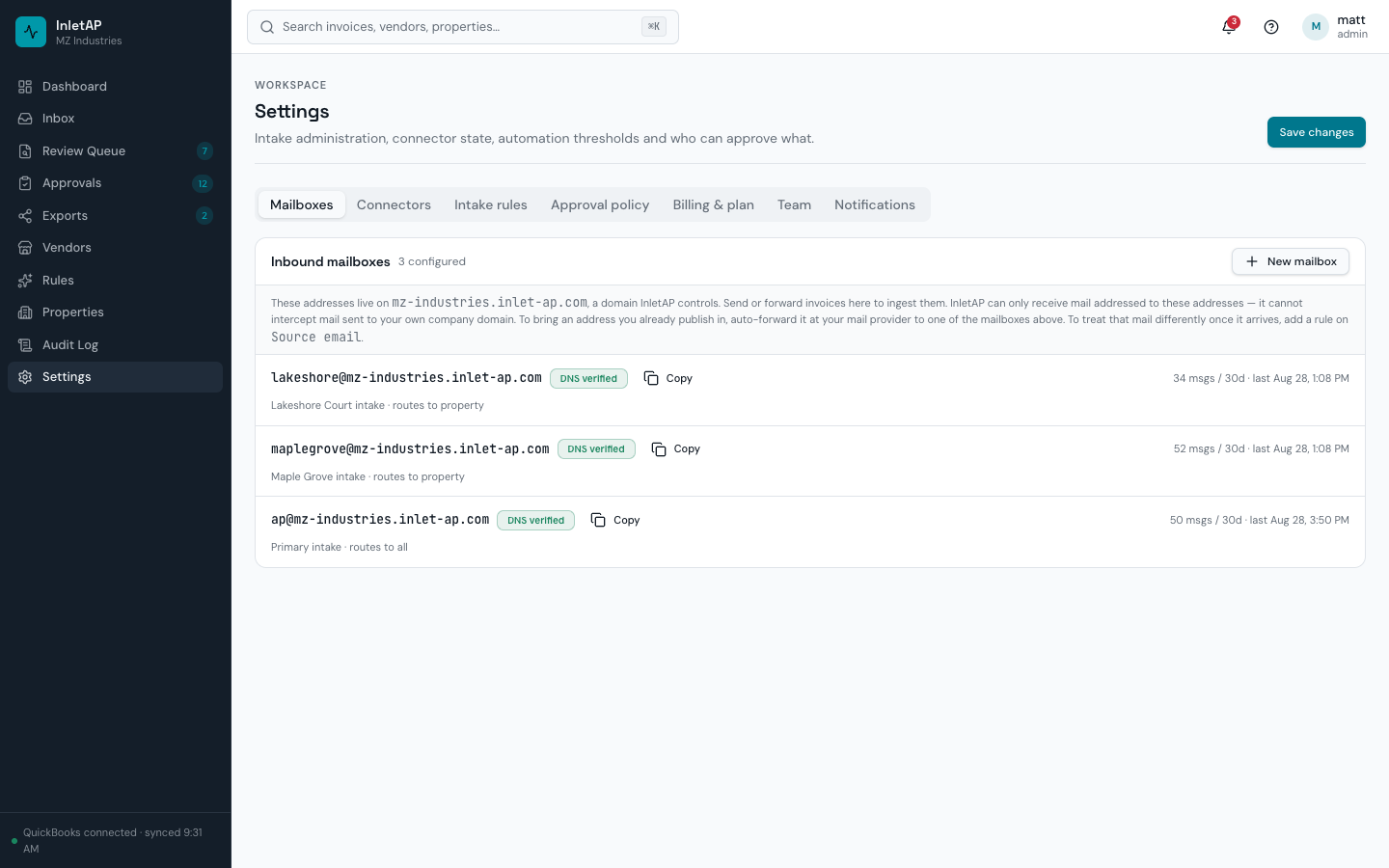
Invoices arrive at an address inletAP runs. Or forward the one vendors already use.
- Your own subdomain, yourcompany.inlet-ap.com. Every address on it is live as soon as you create it.
- A portfolio catch-all, plus a mailbox per property, entity or joint venture.
- PDFs, photos and images of paper invoices, Office documents, and invoices typed into the email body.
- A re-sent copy of the same email is refused at the door. Duplicate matching runs right after extraction.
One limitation, stated plainly
inletAP cannot receive mail sent to your own domain; your DNS and mail provider control that, for every vendor. Auto-forward it instead, which takes a few minutes in Google Workspace or Microsoft 365.
Keep reading
Integration questions
Does inletAP integrate with QuickBooks Online?
What if my accounting system is not QuickBooks or Xero?
Do you support Xero?
Can one invoice post to QuickBooks and Xero at the same time?
Does the Xero connector do everything the QuickBooks one does?
Is there a connector for Yardi, AppFolio, Buildium or Rent Manager?
Can I import my property and vendor lists from the system I use now?
What stops a bad spreadsheet from wrecking our data?
How does email intake actually get set up?
Can I keep using the invoice address my vendors already have?
Can one invoice post into more than one QuickBooks company?
Does splitting work if we track properties as QuickBooks locations?
What happens when an export fails?
Need something that is not here? Tell us what you post to — connector priority is driven by what people actually ask for.
Start free and run your own invoices through it
25 invoices a month, unlimited users, no credit card. Send this month's vendor bills and watch each one get checked, coded and posted to your books.