

An invoice arrives. It leaves checked, coded and approved.
The free plan processes 25 invoices a month with unlimited users, takes no credit card and does not expire. You get your own intake address at the end of setup.
Stage by stage
What happens at each step. And, where it matters, what it deliberately does not do.
- 01
Vendors email the invoice
FromBright Green LandscapingToharborview@yourco.inlet-ap.comAttachedINV-4417.pdfReceivedIn detail
Every organization gets its own intake domain.
Hand the address to your vendors, or auto-forward from the mailbox you already use — the invoice arrives as email, exactly as it does today.
- One catch-all address plus per-property mailboxes
- PDF, image file, photo and Office attachments, and invoices in the email body
- The same message arriving twice is refused at the door on a message-ID and raw-body key; matching on vendor, number, date and amount happens after extraction
- Auto-forward an existing address to a per-property mailbox and routing follows the mailbox
- 02
Fields come out with a confidence score
VendorBright Green Landscaping99%Invoice #441799%Total$1,595.0099%Invoice dateJul 1598%In detail
Vendor, invoice number, dates, totals, tax and line items are extracted per field — each one carrying a confidence score and the evidence it came from.
- Per-field confidence, not one score for the whole document
- “Why this value?” shows the text the model read
- Line-item totals are checked against the stated total and the variance is flagged
- Anything the model is unsure about is routed to a human instead of guessed at
- 03
Rules code it to the GL account and route it
Rule 2 · LandscapingMatchedWhenvendor is Bright Green LandscapingThenset GL account: LandscapingPropertyHarborview ApartmentsIn detail
Map a source email to a vendor, a vendor to a default GL account, and an amount threshold to an approver.
Try a draft rule on a window of your recent invoices before you turn it on; it shows what the rule would do to them today.
Where one invoice covers several buildings, it is split here rather than retyped into a spreadsheet.
- Conditions on vendor, amount, property, sender and confidence
- Actions set coding, assign an approver, auto-approve or quarantine
- Rules run in order and every match is explained on the document
- Simulate is read-only — nothing is routed while you test
- One invoice splits across several properties by amount, percent, even share, unit count or square feet, and the split saves as a reusable template
- 04
A human sees only the exceptions
Invoice #441799%Total$1,595.0099%Tax$0.00?40%Everything else is cleanNeeds reviewIn detail
Clean documents move straight to approval.
The review screen puts the original invoice next to the editable fields, so a correction is a glance and two keystrokes rather than re-keying the invoice.
- Split-pane: rendered document on the left, editable fields on the right
- Edits are tracked against what the model proposed
- ⌥S splits a line without leaving the keyboard; ⌘K jumps to any screen
- Sticky action bar: save, mark duplicate, request info, send to approval, or approve
- Ask the vendor for a corrected invoice from the review screen; when they reply, it arrives in the same workspace linked to the invoice it corrects
- 05
Approvals follow written policy
Up to $2,500 → Property manager$1,595.00Over $2,500 → ControllerWritten to the audit logAwaiting approvalIn detail
Thresholds decide who signs off.
Approvers see why an invoice reached them, batch-approve what is routine, and every decision is written to the audit log with the comment attached.
- Amount tiers and per-property approvers, with low-confidence documents held in review before they reach the ladder
- SLA timers, with one overdue notification per invoice to everyone who subscribed to them
- Batch approve, with a comment required on rejection
- Every decision is attributable, and re-coding a signed invoice sends it back for approval
- 06
Approved bills post to your ledger
QuickBooks Online · BillPostedVendorBright Green LandscapingAmount$1,595.00Class · GLHarborview · LandscapingExternal IDrecorded on the documentIn detail
Approved invoices post to the books you already keep — QuickBooks Online and Xero through direct connectors, or a CSV whose columns you define yourself for anything else.
Failed batches say what broke and retry without duplicating.
- QuickBooks Online bills with vendor, property class and GL account
- Xero bills with the supplier as a contact, an account code and its own tax on every line, and the source PDF attached where the invoice arrived with one
- A split invoice whose properties keep separate books posts as one bill per company or organization, and the export preview says how many before you press it
- A CSV export you map yourself: seven columns by default, up to 64, at document or allocation granularity
- External IDs recorded so a batch can be reconciled back to the document
- Retries are idempotent — a retry cannot double-post
To see stages 01 and 02 on an invoice of your own, email one vendor invoice to the Invoice Inbox Test and read the fields that come back. No account and no card.
Before the first invoice — optional
Set the portfolio up from a file. Not by typing it in.
1 · Match your columns
HV01 · MC02 · LS03
Three values from your file
2 · Read the preview
- CreateProperty · Lakeshore
- ChangeBright Green Landscaping · Payment terms
Net 15→ Net 30 - Error“Apex Plumbing” matches two records: Apex Plumbing Inc. and Apex Plumbing LLC
The preview writes nothing.
It matches on the same keys every time, so uploading the same file again updates what is there instead of creating it twice.
It is one file, read once at setup — not a connection to your property management system. You can also skip all of this and add properties and vendors as invoices arrive.
The steps in full
- Export your property, unit, vendor or entity list from whatever you run today — or download the inletAP template, which describes every column and shows a filled example row.
- Upload it as a .csv, or as an .xlsx workbook, which your browser converts to CSV before it is sent.
- Match your columns to inletAP's fields once. Three real values out of your own file sit under each column name, so “Prop Cd” is recognizable before you commit to it.
- Read the preview. Every row says whether it would create a record or change one, and a change lists each field with the old value beside the new.
- A row that matches two existing records is reported as an error naming both, never guessed at. A required column nothing feeds makes the rows errors that name it, rather than rejecting your file.
- Then import. It matches on the same keys every time, so uploading the same file again updates what is there instead of creating it twice.
- 5,000 rows per file. Properties, units, vendors and entities only — no invoices and no history.
The import preview writes nothing. It names every row it would create, every row it would change and, for a change, the old value beside the new one — and a row it cannot place, or could place two ways, is reported as an error naming both records rather than guessed at. That is the same promise this product makes at the other end of the pipeline: the export preview names the companies and the amounts before you press Export.
Most property management systems export through a report builder, so no two exports look alike — which is why the mapping step is the feature rather than a list of logos. You point each column in your file at the field it feeds, with three real values from your own file shown under each column name, and an unrecognized heading is ignored rather than fatal. What it is not: a connection to your property management system. inletAP reads a file you exported yourself, once, and nothing after that is kept in step — see which direction is which.
The honest part
What inletAP cannot do, stated up front. Where it starts, and where it stops.
Mail to your own domain
Your DNS and mail provider route it, not us. Auto-forward it to an inletAP mailbox.
inletAP
Receive, read, check, code, approve, post
Your ledger
QuickBooks Online, Xero or a CSV
Payment
No ACH or check disbursement rails, by design. Payment runs wherever it runs today.
The review screen
Extraction is not perfect on every vendor. So the review screen shows which field is unsure.
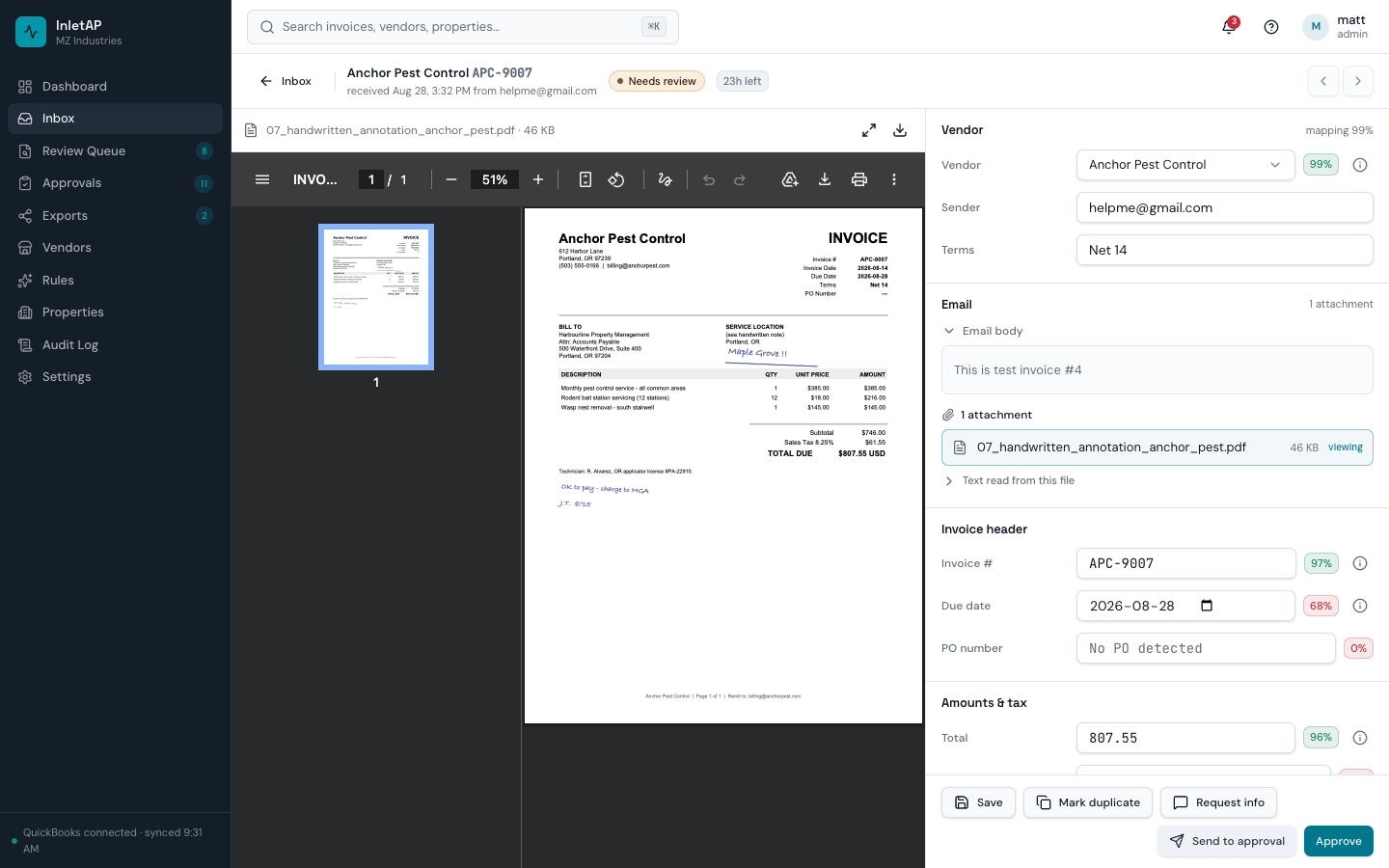
What the screen gives you
- Rendered document on the left with zoom and page navigation.
- Editable fields on the right, grouped into vendor, header, amounts and coding.
- A confidence chip on every field that has one.
- “Why this value?” shows the text the value was read from.
- Line-item totals checked against the stated total, with the variance named.
- Edits tracked against what the model proposed, so corrections are visible.
- Sticky action bar: save, mark duplicate, request info, send to approval, approve.
- ⌥S splits a line without leaving the keyboard.
When one invoice covers several buildings
Splitting happens on the document. Not in a spreadsheet.
GreenLeaf Landscaping · grounds care
$12,480.00
One invoice, three properties.
- Harborview Apartments$5,200.00Books: Harborview LLC
- Maple Court$4,160.00Books: Maple Court LP
- Lakeshore$3,120.00Books: Lakeshore Holdings
Adds up to the invoice total$12,480.00
Nothing saves until the remaining amount is exactly $0.00. Where the buildings keep separate books, it posts one bill per company.
How the split is computed
- Properties named in the invoice text are matched against your property aliases and proposed as pre-filled rows, each with the exact text it was read from.
- The split is computed by amount, percentage, even share, unit count or square footage, and nothing saves until the remaining amount is exactly $0.00.
- The odd cent from a split three ways is given to a specific row by largest remainder and marked, rather than dropped or spread.
- The split saves as a named template, optionally tied to that vendor, so next month is one action.
- An approval can be scoped to one property's share, so a property manager signs for their own building.
- At export, properties that keep separate books produce one QuickBooks bill per company, and the preview says how many before you press it.
How splitting works in detail — the five bases, the rounding rule, and the one QuickBooks setup where none of this is possible.
How it works — common questions
How do vendors know where to send invoices?
Why can't inletAP just receive mail sent to invoices@mycompany.com?
What formats can it read?
What does 'confidence' mean in practice?
Can a rule approve an invoice without a person seeing it?
We have hundreds of properties and units. Do we have to enter them by hand?
What if the spreadsheet is wrong?
What happens if extraction gets something wrong?
Still deciding? Read the controller's view, the principal's view or the full FAQ, including the answers that rule inletAP out.
Start free and run your own invoices through it
25 invoices a month, unlimited users, no credit card. Send this month's vendor bills and watch each one get checked, coded and posted to your books.