
AP automation that checks the bill, not just captures it.
The free plan processes 25 invoices a month with unlimited users, takes no credit card and does not expire. You get your own intake address at the end of setup.
The problem
Most AP tools were built for a company with one address and one ledger
What the morning looks like today
- · Open the shared mailbox, download attachments, rename them, file them.
- · Key vendor, number, date, total and tax into the ledger by hand.
- · Guess which building an invoice belongs to from the service address.
- · Forward it to a property manager and hope they reply before it is late.
- · Discover at close that two people entered the same invoice.
- · Reconstruct, from an email thread, who approved what and when.
What inletAP changes
- Every bill is compared against what that vendor charged for that building last time, and against your approval thresholds — duplicates are caught before anyone pays them twice.
- Fields are extracted with a confidence score and the evidence behind each one.
- Rules apply the coding you would have applied and explain which rule matched, and you can preview a rule against sample documents before you switch it on.
- Only genuinely ambiguous documents reach a person.
- Approval routing is policy, with SLA timers, not a chased email thread.
- The invoice gets in without anyone downloading it: vendors send to an address that belongs to the property, or you forward the mailbox you already use.
How it works
Document in. Checked, coded, approved, exported bill out.
Vendors email the invoice
Every organization gets its own intake domain. Hand the address to your vendors, or auto-forward from the mailbox you already use — the invoice arrives as email, exactly as it does today.
Fields come out with a confidence score
Vendor, invoice number, dates, totals, tax and line items are extracted per field — each one carrying a confidence score and the evidence it came from.
Rules code it to the GL account and route it
Map a source email to a vendor, a vendor to a default GL account, and an amount threshold to an approver. Preview a rule against sample documents before you turn it on. Where one invoice covers several buildings, it is split here rather than retyped into a spreadsheet.
A human sees only the exceptions
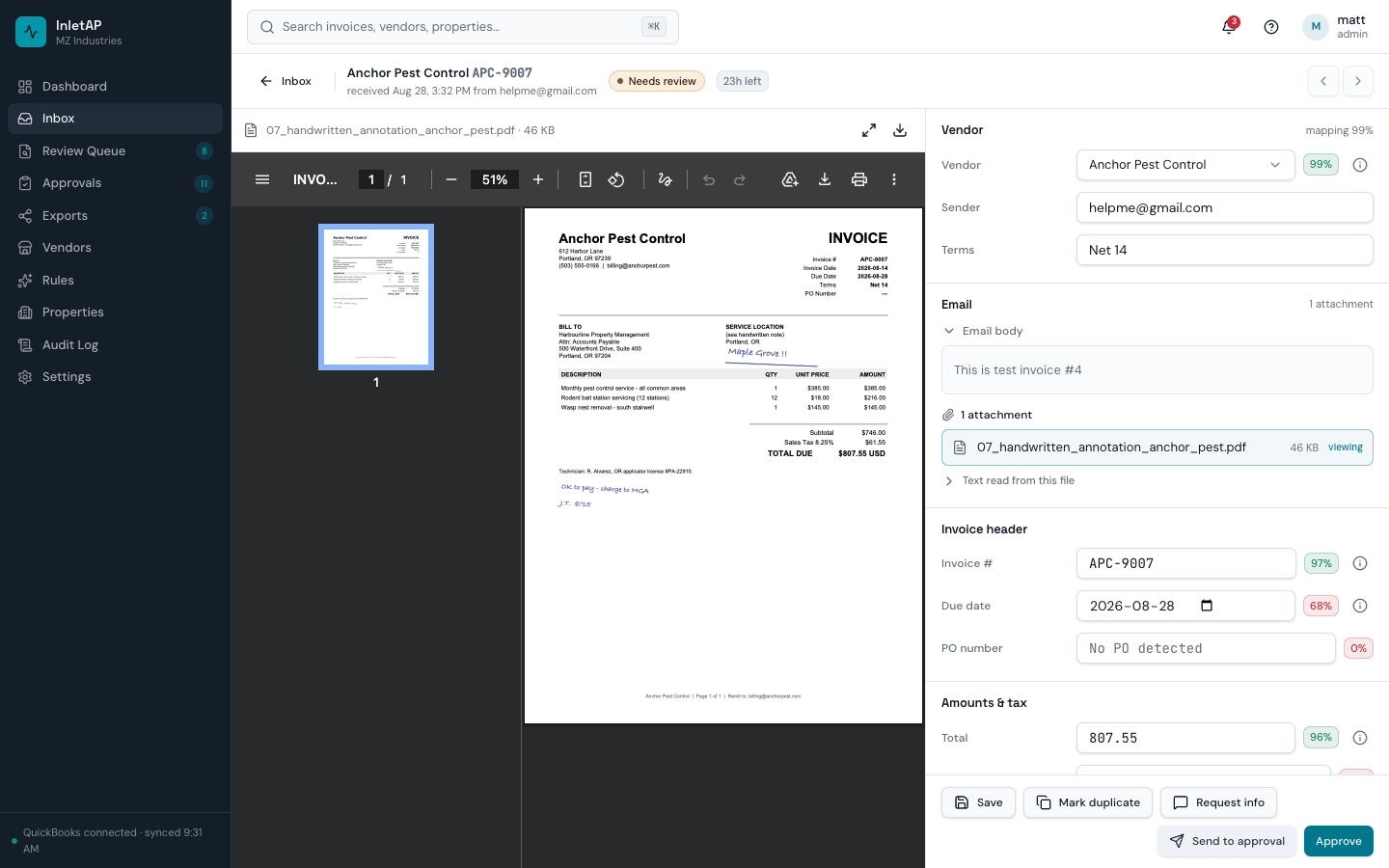
Clean documents move straight to approval. The review screen puts the original invoice next to the editable fields, so a correction is a glance and two keystrokes rather than re-keying the invoice.
Approvals follow written policy
Thresholds decide who signs off. Approvers see why an invoice reached them, batch-approve what is routine, and every decision is written to the audit log with the comment attached.
Approved bills post to your ledger
Approved invoices post to the books you already keep — QuickBooks Online and Xero through direct connectors, or a CSV whose columns you define yourself for anything else. Failed batches say what broke and retry without duplicating.
49 seconds, with narration. The commentary is also written into the picture as captions, so nothing is missing with your sound off. It is a real screen recording, not an animation.
What it shows, in words: the review queue, where every invoice has already been compared against that vendor’s own history. A Bright Green Landscaping bill for Harborview Apartments has arrived at $1,595.00, against the $1,450.00 that vendor has charged for that property every month since November — nine invoices, to the cent. Two more invoices from a different vendor sit under the $2,500.00 approval threshold on their own but go over it together. The same sprinkler-inspection bill turns up a second time, byte for byte. One click on “That’s fine” records the decision and says, in words, what it will not ask about again. The clip ends on the published price list.
Read the full walkthrough — what each stage does, and what it deliberately does not do.
The accuracy bar
A tool that is 95% right still makes you check every line
So every field carries its own score, and shows its evidence: the line of text the value was read from, when the value actually appears in the document. When it does not appear verbatim the panel says so — a value the model inferred rather than read is precisely the one worth checking. A document where the total reads 99% and the property reads 58% is one glance and one correction, not a re-key. And it does not go quietly through: a confidence score under the bar, a file we could not read, or an invoice that names no single property all send the document to a person on purpose.
Why this and not a generic AP tool
Seven things that are different because the vertical is different
Every bill gets a second look
Each invoice is compared against what that vendor billed for that property before, against your approval thresholds, and against every invoice you already hold from them — duplicates from day one, price changes once there are about five invoices to compare. Baselines are kept per vendor and per property, because the same landscaper can be on a fixed contract at one building and time-and-materials at another. Nothing to set up: connect and the findings appear on real invoices. It does not hold the bill and does not contact the vendor; only a top-tier duplicate stops an export.
Published pricing, self-serve start
The price is on the site: $0, $39, $99 and $249 a month, with no demo gate, no implementation fee and no annual minimum. Every plan has unlimited users — including the free one — so an approver costs nothing and the meter counts documents rather than seats. The free plan is 25 documents every month, forever, with no card and no expiry, which is enough to run a real month rather than a two-week trial.
One invoice can belong to five buildings
Property, unit, ownership entity, GL account and cost center are fields on the invoice itself, and the QuickBooks class is derived from the property at export. A vendor invoice covering five properties is split across property, unit, entity, GL account and class — by amount, percent, even share, unit count or square footage, balanced to the cent. Where those buildings keep separate books it posts as one bill per company.
A guessed value cannot be approved automatically
Confidence is scored per field, not per document: the total reads 96% and the due date 68%, with the text each value was read from. A value the model inferred rather than read is capped below the bar that lets anything through on its own, so the fields worth checking are the ones you are asked to check.
Approvals follow written policy
Amount tiers, per-property approvers, low-confidence documents held in review before they reach the ladder, SLA timers with overdue alerts. The approver sees why the invoice reached them, in the queue, next to the approve button.
Every change is attributable
Append-only audit log with actor, timestamp and the value written on every field edit, routing decision and approval. Nobody has to reconstruct what happened at close.
The intake address is not your mailbox
Documents arrive however they already do — a vendor-facing address on your own subdomain, an upload, or forwarding from the mailbox you use today. That address only ever receives invoices. There is no OAuth grant to approve and no IMAP password to store, which is what tools that read your whole inbox ask for.
The economics
Manual AP has a well-documented per-invoice cost
- $9.84
- average fully-loaded cost of processing one invoice, across all AP operations
- $2.65
- fully-loaded cost of processing one invoice at best-in-class AP operations, against $12.42 for all others
- 18.4%
- of invoices stop for a human somewhere in the process, on average
Industry benchmarks for the accounts payable category, not inletAP customer results. Source: Ardent Partners, State of ePayables 2025.
Who it's for
Four people touch an invoice. All four have a different question.
AP specialists
Stop re-typing invoices that were already typed once
You live in the queue. inletAP hands you the documents that genuinely need a decision and gets out of the way on the rest.
For ap specialistsControllers & finance leads
Consistent coding and a close you can defend
Coding standards enforced by rules instead of tribal knowledge, approvals on written policy, and an audit trail that answers the question before your auditor asks it.
For controllers & finance leadsProperty managers
See what your building owes without asking accounting
Filter to your properties, approve from your phone, and know that the HVAC invoice from Tuesday is not sitting unread in a shared mailbox.
For property managersOwners & principals
AP controls that do not need another headcount
Separation of duties you can switch on, duplicate-payment protection and a per-invoice cost you can actually calculate — without an enterprise implementation project.
For owners & principalsIntegrations
It hands finished bills to the system you already run
- QuickBooks Online — a direct connector; approved invoices post as bills with vendor, class and GL account mapped.
- Xero — a direct connector; approved invoices post as bills with the supplier as a contact, an account code and tax on every line, and the source PDF attached where the invoice arrived with one.
- Connect both and one approved invoice posts to both, as one bill in each — and a document that reaches only one of them says so.
- CSV export — one generic file you map yourself: seven columns by default, up to 64, at document or allocation granularity, on every plan including free.
- Nothing else is built. AppFolio, Buildium, Yardi and Rent Manager have no connector and no tested import profile, and we are not going to call them CSV destinations to make the list longer.
- That list is about bills going OUT. Data coming IN at setup is a separate thing and it does exist: your property, unit, vendor and entity lists import from a spreadsheet you export yourself, with your columns matched to ours. It is one file read once, not a connection to any of those products.
- Email intake over SMTP — your own subdomain, with per-property mailboxes.
- Forwarding from Google Workspace, Microsoft 365 or any provider that can auto-forward.
Controls
The parts your auditor will ask about
Questions buyers ask
What does inletAP actually do?
Do I have to replace my property management or accounting system?
Can inletAP receive mail sent to my own company domain?
How long does setup take?
What happens when the extraction is not confident?
How is inletAP priced?
Which accounting systems does it export to?
Does it catch duplicate invoices?
Does it tell me when a vendor's price goes up?
Can one invoice be split across several properties, or several companies?
Longer answers, including the ones that rule inletAP out, are on the full FAQ.
Start free and run your own invoices through it
25 processed invoices a month, unlimited users, no credit card. Point a few vendors at your intake address and see the extraction, the coding and the audit trail on your own documents.